After over a decade in enterprise software development, I’ve learned a painful truth: most low-code platforms promise agility but deliver dependency. They speed up development, but shackle you to proprietary systems that are impossible to leave.
With Simplifier, we have chosen a different path – one that we “Exit-by-Design” call it. We plan your exit from day 1. It sounds counterintuitive, but it’s the only way to build real trust. Here’s why true code ownership is critical in low-code environments and how we make sure you’re never trapped in our platform.
The low-code dilemma: speed vs. control
Most companies choose low-code platforms for one simple reason: they need to deliver digital solutions quickly. But what happens if your requirements change? If the provider raises prices? If the platform is discontinued?
The traditional low-code problem:
- Your business logic is stored in proprietary formats
- Data export is limited or impossible
- Customization is only possible within the platform
- Migration means completely new development
Simplifier’s approach to true code ownership:
- Business logic in readable JavaScript within Business Objects
- Standards-based UI based on OpenUI5/SAPUI5
- Open connector architecture with 12+ integration types
- Transparent deployment options: On-Premise, SAP BTP or Simplifier Runtime
The three levels of low-code vendor lock-in

The most dangerous lock-in happens at the data level as soon as your company data is trapped in proprietary formats. But the logic level is also often underestimated: If your business rules only exist within a platform, you basically no longer own your own business logic.
Simplifier's architecture for platform independence
What sets Simplifier apart from other low-code platforms is not a single feature – it’s a fundamental architectural decision. Every layer of the platform has been designed to be based on open standards and protect your investment.
1. business objects: Your logic, your code
At the heart of every Simplifier application are Business Objects. These are server- and client-side logic containers that encapsulate your business rules in readable JavaScript.
What that means in concrete terms:
- Server-side Business Objects contain your business logic as JavaScript functions with defined input and output parameters. Each function can be individually tested, versioned and documented.
- Client-side Business Objects control the UI logic and can access data sources directly.
- Business Objects can call up other Business Objects, use connectors, integrate plug-ins and all this via clearly defined, documented interfaces.
- Recently, Simplifier has even started to support AI-supportedcreation of Business Objects, which further accelerates development.
The key difference:Your business logic is not hidden in a proprietary visual format. It is readable JavaScript code that your developers can understand, check and – if necessary – transfer to any other JavaScript environment.
2. open connector architecture
Instead of tying you to proprietary integration APIs, Simplifier offers an open connector architecture with over 12 specialized connector types:

Why this is crucial for your independence:
Each connector is configured via the Simplifier platform – with standardized authentication methods such as OAuth2, certificates, username/password, SAP logon tickets or token-based authentication. The configuration is transparent and documented.
This means that your integrations are not hidden in proprietary code. You know exactly which systems are connected, which authentication is used and which data flows. If you want to leave Simplifier, you have complete documentation of your integration landscape and can rebuild it using standard technologies.
| Connector type | Target systems | Standard |
|---|---|---|
| SAP RFC | SAP ECC, S/4HANA | RFC protocol |
| REST | Any REST APIs | HTTP/HTTPS |
| OData | SAP, Microsoft, etc. | OData V2/V4 |
| SQL | PostgreSQL, Oracle, SQL Server, MySQL | Standard SQL |
| SOAP | Legacy Enterprise Services | WSDL/SOAP |
| MQTT | IoT devices, brokers | MQTT 3.1/5.0 |
| OPC UA | Industrial control systems | OPC UA Standard |
| CSV | File import/export | CSV format |
| SMTP/IMAP Server | Email protocols | |
| Push | Mobile devices | Push Notification Standards |
| Proxy | Network routing | HTTP Proxy |
3. OpenUI5/SAPUI5: UI based on open standards
This is one of the biggest differences to other low-code platforms: Simplifier is based on OpenUI5/SAPUI5 and SAP Fiori Design Guidelines and not on proprietary UI frameworks.
What that means for you:
- OpenUI5 is open source. The entire UI framework code is publicly available at openui5.org. Their UI investments are based on a framework that exists independently of Simplifier.
- SAP Fiori Design Guidelines provide enterprise-grade UX that your users are already familiar with – especially in SAP environments.
- Drag-and-drop with substance: Simplifier’s visual app builder uses widget groups and custom widgets based on OpenUI5 components. You can create your own widgets, integrate external libraries and customize the theming using the integrated CSS editor.
- Cross-platform: Your apps run without separate development, in the browser and as native mobile apps (iOS/Android) via the Simplifier Mobile Client.
For comparison: Many low-code platforms use proprietary rendering engines that tie your UI components inextricably to the platform. With Simplifier, your UI is based on an open standard maintained by SAP and a large open source community.
4. data sovereignty by design
Simplifier follows a clear principle: Your data belongs to you – and stays in your systems.
The platform offers an integrated Database Designer with which you can:
- Create and manage database schemas
- Import and connect existing databases
- Edit and export data directly
- Transport schemas between environments
Simplifier functions primarily as a Integration and presentation layer. Your data remains in your SAP systems, your SQL databases and your REST APIs. The platform accesses it via connectors, but does not store any business data permanently in proprietary formats.
This is a fundamental architectural difference: while other platforms copy your data into their own databases and lock it up there, Simplifier leaves your data where it belongs – in your systems.
Migration strategies: Get out of Simplifier (if you want)
The “exit-by-design” approach
At Simplifier, we plan your exit from day 1. It sounds counterintuitive, but it’s the only way to build real trust. We call this “Exit by design”. Sounds like a marketing slogan, but it’s an architectural decision.
Why migration is realistic
Let me explain the four reasons why an exit from Simplifier is not a nightmare scenario:
1. your business logic is portable JavaScript code
Business Objects contain JavaScript functions with clearly defined interfaces. This logic can be transferred to any Node.js environment, any Express server or any other JavaScript backend. You don’t have to “translate” a proprietary language – it’s already JavaScript.
2. your integrations are based on standards
Every Simplifier connector uses standard protocols: RFC for SAP, HTTP/REST for APIs, standard SQL for databases, MQTT for IoT. When you leave Simplifier, you replace the connector with the corresponding native SDK or a standard library – the protocols and endpoints remain identical.
3. your UI is based on OpenUI5 – an open source framework
OpenUI5 applications can be run standalone. You do not need a Simplifier server to run an OpenUI5 app. The migration primarily means replacing the Simplifier-specific hosting layer with your own web server.
4. the transport system documents your entire application
Simplifiers Transportation system allows you to export your applications as packages, including business objects, connector configurations, UI definitions and workflow definitions. These packages are your complete application documentation.
The transportation system: your insurance policy
The transportation system is an often overlooked but crucial feature for your independence:
- Create packages: Combine apps, business objects, connectors and configurations in transport packages
- Manual transport: Export packages and import them into other environments
- Remote Transport: Automated transport between connected Simplifier instances
- Environment management: Development → Test → Production with full traceability
Why this is important for exit-by-design: The transport system gives you a complete snapshot of your entire application landscape at all times. You know exactly what you have, how it is configured and how it is connected.
Common low-code lock-in traps – and Simplifier's answers
1. the “Proprietary Widget” trap
The problem: Other platforms use proprietary UI components that only work within the platform. Your entire UI investment is lost if you switch.
Simplifier’s answer: The UI is based on OpenUI5/SAPUI5 – a framework with over 700 enterprise UI components that is maintained by SAP as open source. Simplifier extends this framework with a visual builder, custom widgets and a CSS editor, but the basis remains an open standard.
When you leave Simplifier, you take your OpenUI5 knowledge and investment with you. The framework exists independently of Simplifier and is being further developed by a large community.
2. the “Workflow Engine” trap
The problem: business logic is trapped in proprietary workflow engines that can only be executed within the platform.
Simplifier’s answer: Simplifier’s workflow engine provides a visual builder with conditions, variables and outcomes. Workflows consist of clearly defined steps:
- User tasks – tasks that require human interaction
- Automated Tasks – Automatically executed steps (e.g. business object calls)
- Notification tasks – Notifications to users or systems
- Parallel execution – Multiple workflow paths simultaneously
The workflow logic is transparent: each step has defined inputs, outputs and conditions. During a migration, you can translate this logic into any other workflow engine or into programmatic orchestration because the business rules are documented and traceable.
3. the “integration lock-in” trap
The problem: Integrations only work within the platform. If you switch, you have to rebuild all integrations from scratch.
Simplifier’s answer: Each connector documents exactly which target system is connected, which authentication is used and which operations are called. This information is your integration documentation.
When migrating, replace the Simplifier connector with the native SDK of the target system:
| Simplifier Connector | Native equivalent |
|---|---|
| SAP RFC Connector | SAP NW RFC SDK / node-rfc |
| REST Connector | axios / fetch / got |
| OData Connector | SAP Cloud SDK / odata-client |
| SQL Connector | pg / mysql2 / oracledb |
| MQTT Connector | mqtt.js |
The protocols, endpoints and authentication methods remain identical – only the abstraction layer changes.
Deployment flexibility: No single point of failure
Another aspect of platform independence is deployment flexibility. Simplifier offers three deployment options:

Why this is important: You are not tied to a single cloud. Simplifier is available on the AWS Marketplace, the Azure Marketplace and the SAP Store. If your cloud strategy changes, your deployment will change, but not your application.
For mobile applications, Simplifier offers a native mobile client for iOS and Android. Your apps can be published as standalone mobile apps in the app stores – another aspect of independence.
Monitoring your platform independence
The Simplifier Independence Score
How independent are you really? Here is a framework for self-assessment:
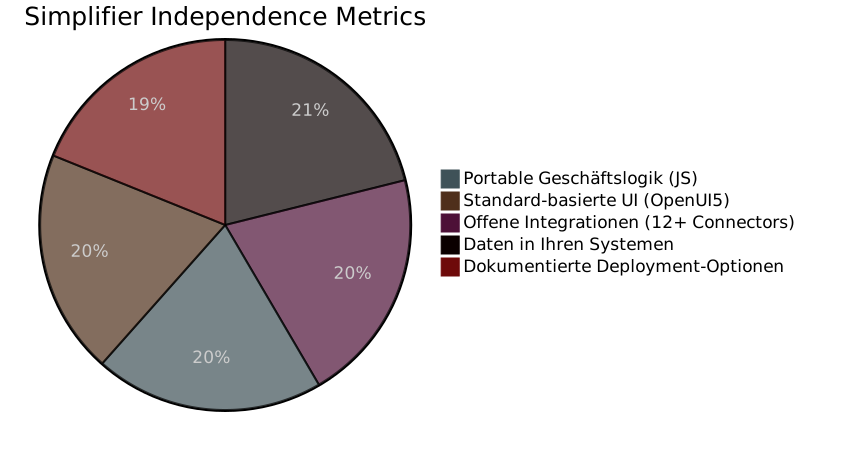
Your Independence checklist
Instead of an invented CLI tool, here is a practical checklist that you should go through regularly:
Business logic portability:
- [ ] Are all Business Objects documented?
- [ ] Is the JavaScript logic understandable without Simplifier-specific APIs?
- [ ] Are there unit tests for each critical function?
Integration transparency:
- [ ] Is each connector documented with target system and authentication?
- [ ] Do you know the native SDK equivalents for each connector?
- [ ] Are your API endpoints and credentials stored independently of Simplifier?
Data sovereignty:
- [ ] Is your business data stored in your own systems?
- [ ] Can you access all data without Simplifier?
- [ ] Is your database schema documented in the Database Designer?
Deployment flexibility:
- [ ] Did you consciously choose your deployment option?
- [ ] Do you know the alternatives (on-premise, BTP, runtime)?
- [ ] Are your transport packages up to date?
Why Simplifier is different: numbers instead of promises
Instead of empty promises, here are the facts that back up Simplifier’s position:
| Feature | Simplifier | Typical low-code platform |
|---|---|---|
| UI framework | OpenUI5/SAPUI5 (Open Source) | Proprietary |
| Business logic | JavaScript (readable, portable) | Proprietary format |
| Connector standards | RFC, REST, OData, SQL, SOAP, MQTT, OPC UA | Platform’s own APIs |
| Data storage | In your systems | In the platform cloud |
| Deployment | On-Premise, SAP BTP, Cloud (AWS/Azure) | Provider cloud only |
| Mobile | Native iOS/Android client | WebView or proprietary |
| Transport/Export | Complete package system | Limited or not available |
| SAP integration | SAP Silver Partner, SAP-certified | Often only via REST |
| Community | 5,500+ app builders, 120,000+ end users | Varies |
Transparent pricing without lock-in
An often overlooked aspect of vendor lock-in is pricing. If exporting your data and applications costs extra, this is a hidden lock-in fee.
The following applies to Simplifier:
- No extra charge for export – The transport system is part of the platform
- No migration fees – your data and logic belong to you
- No hidden costs for standard connectors
- Proactive migration support – We help you leave if that is your decision